Advanced Example#
In this advanced example two input files, a spectrum file and a manually created Settings object are used to generate a basic data set for an Earth-like planet orbiting a Sun-like star 10 pc away. The Settings object will overwrite the settings specified in the config file. The code is run on GPU #0 in detailed mode, thus also saving and outputting the intensity responses.
Import modules and specify paths#
[6]:
from pathlib import Path

import matplotlib.pyplot as plt
import numpy as np
import torch

from phringe.api import PHRINGE
from phringe.core.entities.simulation import Simulation

config_file_path = Path('../_static/config.py')
Create Simulation Object#
Note: passing a Simulation object to the run method will overwrite the simulation specified in the config file.
[2]:
simulation = Simulation(
    grid_size=20,
    time_step_size='1 d',
    has_planet_orbital_motion=False,
    has_planet_signal=True,
    has_stellar_leakage=True,
    has_local_zodi_leakage=True,
    has_exozodi_leakage=True,
    has_amplitude_perturbations=True,
    has_phase_perturbations=True,
    has_polarization_perturbations=True
)
Run PHRINGE on GPU#
Note the specification of the zeroth GPU to be used for the calculations. See the documentation of PHRINGE.run() for more information on the parameters.
[3]:
phringe = PHRINGE()
phringe.run(
    config_file_path=config_file_path,
    simulation=simulation,
    gpu=0,
    fits_suffix='',
    write_fits=True,
    create_copy=True,
    normalize=False
)
Retrieve Basic Simulation Parameters#
[4]:
wavelengths = phringe.get_wavelength_bin_centers(as_numpy=True)
time_steps = phringe.get_time_steps(as_numpy=True)
fov = phringe.get_field_of_view(as_numpy=True)
Plot Data and Differential Intensity Response#
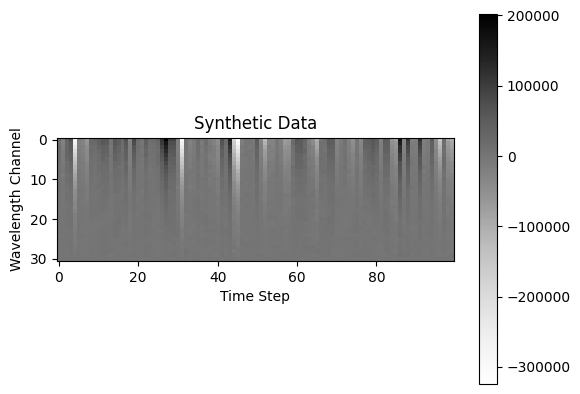
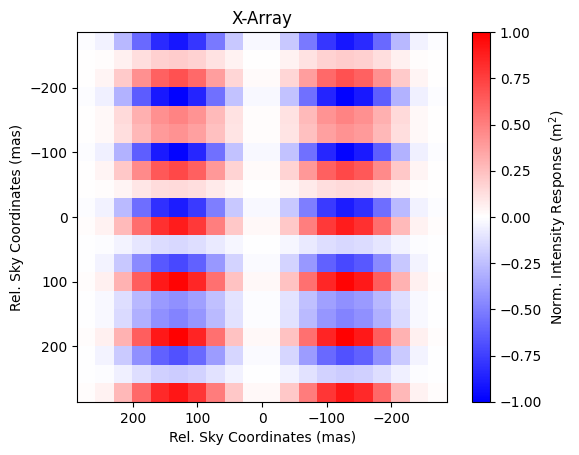
Plot the data in photoelectron counts and plot the corresponding (perturbed) differential intensity response.
[5]:
data = phringe.get_data(as_numpy=True)
intensity_response = phringe.get_intensity_response_torch('Earth')
wavelengths = [round(wavelength * 1e6, 1) for wavelength in wavelengths]
time_steps = [int(round(time, 0)) for time in time_steps]
wavelength_index = 6
fov = (fov[wavelength_index] / 2) * 2.063e8
differential_ir = intensity_response[2, wavelength_index] - intensity_response[3, wavelength_index]
differential_ir /= torch.max(abs(differential_ir))

plt.imshow(data[0], cmap='Greys')
plt.title('Synthetic Data')
plt.ylabel('Wavelength Channel')
plt.xlabel('Time Step')
plt.colorbar()
plt.show()

im = plt.imshow(differential_ir[0], cmap='bwr', extent=(fov, -fov, fov, -fov), vmin=-1, vmax=1)
plt.title('X-Array')
plt.xlabel('Rel. Sky Coordinates (mas)')
plt.ylabel('Rel. Sky Coordinates (mas)')
cb = plt.colorbar(im)
cb.set_label(label='Norm. Intensity Response (m$^2$)')
plt.show()
Plot the Template Function#
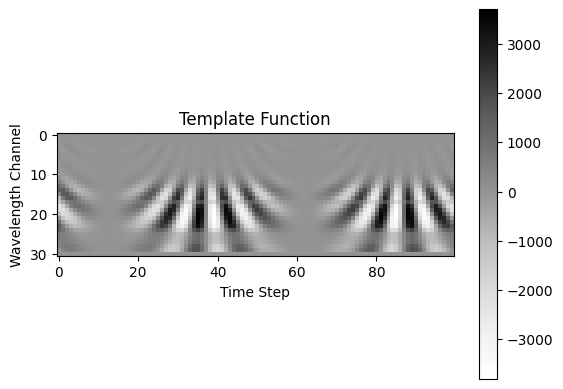
Plot the template function corresponding to the (ideal, i.e. unperturbed) signal of a planet at a certain position in the field of view. Use the initial flux for the template generation.
[10]:
time = phringe.get_time_steps(as_numpy=True)
wavelength_center = phringe.get_wavelength_bin_centers(as_numpy=True)
wavelength_bin = phringe.get_wavelength_bin_widths(as_numpy=True)
pos_x = np.array(3e-7)  # rad
pos_y = np.array(3e-7)  # rad
flux = phringe.get_spectral_flux_density('Earth', as_numpy=True)
template = phringe.get_template_numpy(time, wavelength_center, wavelength_bin, pos_x, pos_y, flux)

plt.imshow(template[0, :, :, 0, 0], cmap='Greys')
plt.title('Template Function')
plt.ylabel('Wavelength Channel')
plt.xlabel('Time Step')
plt.colorbar()
plt.show()
[ ]: